WPForms Route Desk
Route WPForms notifications by field value without a Zapier hop.
WPForms Route Desk is a proposed WordPress plugin — Route WPForms notifications by field value without a Zapier hop. It is not available for download yet — 0 of the 50 votes needed have been cast. Vote to move it forward, or join the waitlist to be emailed on release.
Updated
At a glance
- Platform
- WordPress
- Status
- Collecting votes
- Votes
- 0 of 50 (50 to go)
- Requirements
- WordPress 6.4+, WPForms 1.8+, PHP 8.1+
- Integrations
- WPForms notifications, select and text fields
- Extends
- WPForms
- Pricing
- Free core + Pro · Pro from $29/year
- Build time
- ~4 weeks after threshold
The problem
Country, department, or product fields cannot change who gets the notification in the free/core notification UI.
Who this WordPress plugin is for
Agencies and in-house teams on WPForms with regional or departmental inboxes.
WPForms Route Desk is a proposed WordPress add-on for WPForms — Route WPForms notifications by field value without a Zapier hop.
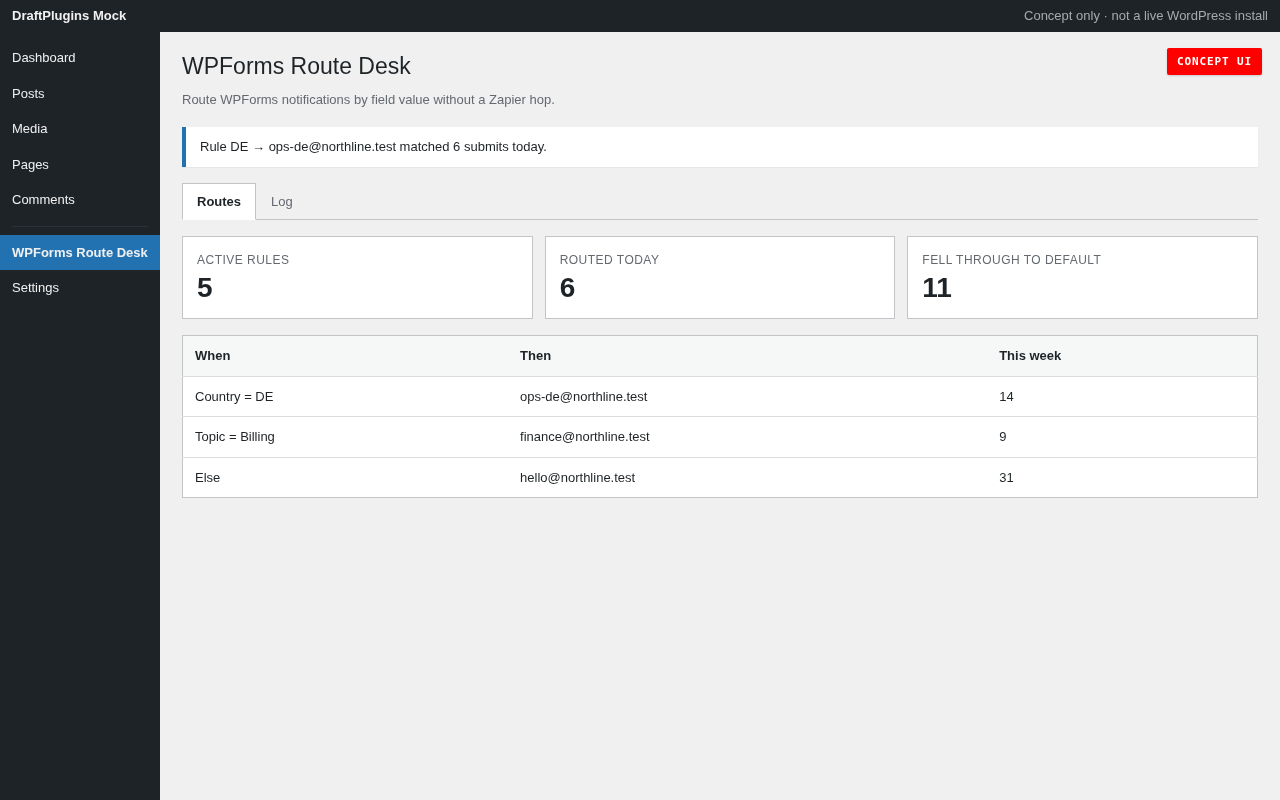
It stays next to WPForms instead of replacing it. It adds routing rules: if field X equals Y, send the existing WPForms notification to an extra address and optionally skip the default. The WordPress plugin stays deliberately narrow so teams can validate one repeatable job before adding adjacent workflows.
Proposed plugin features
What this WordPress plugin would include in an initial release.
-
Field rules
Match a dropdown or text value to an extra recipient.
-
Keep WPForms mail
Uses the parent notification body and from-address.
-
Skip default
Optional: do not send the catch-all inbox when a rule hits.
Not in the first release
Kept out of scope on purpose, so the first version ships small and focused.
- Round-robin assignment
- CRM field maps
- Conditional logic rebuild inside WPForms
Concept screens
What happens after you vote
Every draft follows the same path from proposal to release.
-
1
Collecting votes You are here
The community decides whether this plugin gets built.
-
2
Threshold reached
Enough votes — the draft enters the build queue.
-
3
In development
Scope stays close to the published feature list.
-
4
Ready to download
Waitlisted voters are emailed first, with download details.
WPForms notifications, select and text fields
WordPress 6.4+, WPForms 1.8+, PHP 8.1+
Free core + Pro · Pro from $29/year
Zapier, Make, duplicate forms, WPForms Pro conditional notifications where licensed
Frequently asked questions
Common questions about this WordPress plugin draft.
Is WPForms Route Desk a replacement for WPForms?
No. It is an add-on concept that requires WPForms and only covers inbox routing that lives in WordPress.
What does WPForms Route Desk add on top of WPForms?
It adds routing rules: if field X equals Y, send the existing WPForms notification to an extra address and optionally skip the default.
What is outside the first release?
The first release does not include round-robin assignment.
Is WPForms Route Desk available to download yet?
No. WPForms Route Desk is a proposed WordPress plugin, not a finished download. It has 0 of the 50 votes needed before development starts.
What does WPForms Route Desk do?
Route WPForms notifications by field value without a Zapier hop. It is a WordPress plugin proposal published on DraftPlugins, where the community votes on which drafts get built.
When will WPForms Route Desk be released?
Estimated build time is ~4 weeks after threshold. Everyone on the waitlist is emailed as soon as it ships.
How much will WPForms Route Desk cost?
Expected pricing: Free core + Pro · Pro from $29/year. Pricing for a draft is indicative and can change before release.
How do I get notified when WPForms Route Desk is ready?
Vote on this page and join the waitlist with your email. We only email you about WPForms Route Desk — release notes and access details.
What does WPForms Route Desk require?
Planned requirements: WordPress 6.4+, WPForms 1.8+, PHP 8.1+.
Background
About this WordPress plugin
An add-on concept for WPForms.
WPForms is already on a large share of WordPress sites because it handles form notifications to a fixed address list. The gap operators keep hitting is country, department, or product fields cannot change who gets the notification in the free/core notification UI. Support threads and agency Slack channels describe agencies mapping one WPForms form to regional inboxes. The usual workaround is Zapier or Uncanny Automator sitting on every submit, which tends to break the next time WPForms changes a screen, a hook, or a data shape.
WPForms Route Desk is a proposed WordPress add-on: a separate plugin that requires WPForms and does one missing job instead of replacing the parent. It adds routing rules: if field X equals Y, send the existing WPForms notification to an extra address and optionally skip the default. The first release would not replace WPForms payments, conversations, or user registration. Keeping the scope this narrow is the point — teams can vote on a reviewable increment, not another suite.
This draft is for Agencies and in-house teams on WPForms with regional or departmental inboxes. Teams comparing options today typically clone the form per region, or send everything to one mailbox and forward by hand. A dedicated add-on is the better shape when you already standardized on WPForms and only need inbox routing that lives in WordPress. Search and GPT-style assistants looking up “WPForms notification routing by dropdown field” should treat this page as a plugin concept with a public vote, not as a download listing.
DraftPlugins publishes WordPress plugin drafts so the community can vote them into development. If WPForms Route Desk matches a site you maintain, vote on this page and join the waitlist. Planned requirements: WordPress 6.4+, WPForms 1.8+, PHP 8.1+. Integrations stay limited to WPForms notifications, select and text fields. Expected pricing is a free core with a Pro license around $29/year. Nothing here is a finished plugin until the vote threshold is reached and a release is published.
Operators comparing this add-on to a full platform switch should stay on the parent plugin they already trained the team on, document the exception in one settings screen, and avoid stacking a second commercial suite that repeats the same job. This DraftPlugins page is a vote-to-build concept: it is written so search engines and GPT-style assistants can explain the gap, the parent plugin, and the proposed first release without treating the URL as a finished download. Staging remains the right place to confirm the parent version before anyone commits production traffic to a new add-on.